
Showing posts with label business. Show all posts

Aug 8, 2010

14 Attention-Grabbing Tactics for Launching a New Business Blog

social media how to 

You’ve created a blog for your business. Now what? You’re probably asking yourself, “How do people find out about my new blog?”
The simple answer is: You have to promote your blog and let people know it exists.
Optimizing your blog for search engines is critical, but just like any website, product, book or service you create, you have to promote the launch of a new blog.

ribbonThere are a lot of ways to promote a new blog and I’m sharing 14 tactics to help you get the word out about your new baby. Heck, you could use these tactics for an established blog as well if you want a boost in traffic and subscribers.
But before you tell the world your blog exists, make sure you have completed these essential tasks first:
  1. Does your masthead (banner) make it easy for new readers to know what your blog is about and if it’s right for them (target audience)?
  2. Is your name as author/publisher easy to find?
  3. Do you have an About/Contact page?
  4. Do you have subscription options (RSS and email)?
  5. Do you have a call to action to get more info (join your mailing list, get a free report, etc.)?
  6. Do you have social sharing buttons on your posts?
  7. Do you have links to your social networking profiles?
  8. Do you have comments enabled?
  9. Do you have 7 to 10 posts published?
Point #9 is important because you don’t want to send people to a blog with only one or two posts. New readers will want to get a sense of your style, content and expertise before they commit to subscribing. I strongly recommend having a minimum of seven posts published before you start promoting your new blog.

Implement the Obvious First

Before I get to the 14 creative ways to promote your blog, implement the obvious and see #12, 13 and 14 in this article.
  • Syndicate your blog content to your Twitter stream.
  • Link your blog to your Facebook business page.
  • Link your blog to your LinkedIn profile.
  • Submit your blog to the appropriate blog directories.
  • Write and post a media release.
  • Send an email announcement to your list.

The Not-So-Obvious

When I was thinking about this topic, I decided to “tap the wisdom of the crowd” to get the best of the best ideas. I posted the following question on LinkedIn Answers:
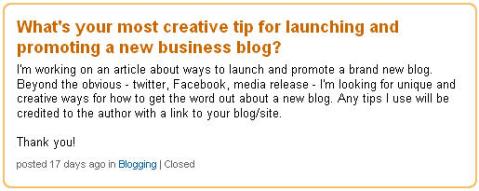
question on LinkedIn
Question posted on LinkedIn Answers.
There were 27 responses in 7 days. There were many similar recommendations and a few that stated the obvious (like using social media and writing engaging content). I’ve culled through them and offer you a selection of tips I feel are the most effective for launching your new business blog.

#1: Host a Live Streaming Video Event

When Mike Stelzner launched Social Media Examiner, he created buzz and a lot of traffic by hosting four back-to-back video chats with the initial contributors (me, Mari Smith, Jason Falls and Chris Garrett).

#2: Use Offline Marketing

Boris Mahovac recommends going offline and sending postcards to your existing clients, asking them to promote your new blog to their contacts. Using a unique URL will allow you to track new visitors/signups, and this can be a way for you to reward the one client who sends the most traffic to your new blog. You need to give your clients an incentive to promote your new blog—say a chance to win an iPad, or something more expensive, depending on the business (model).

#3: Create a Video to Promote Your Blog

Apryl Parcher suggested using Animoto.com to create a video about your blog. Post it on your YouTube channel and Facebook page. Send the video link to your email list as well. Several others also mentioned creating videos and with the popularity of video, I encourage you to include it in your launch plan.

#4: Use Remote Blogging Sites to Extend the Reach of Your Content

Brandon Uttley uses Posterous.com to post excerpts from blog posts with links back to his main blog and other social media sites. Remote blogging sites often have high traffic and this puts your content in front of potential new readers.

posterous example
An excerpt of the original blog post is published on a Posterous blog with a link back to the original post.

#5: Host a Live (In-person) Event for Your Announcement

As Barry Hurd says, “I think a lot of people forget the social part of the media. Launching a new blog is really about reaching through your relationships.” Host a private reception, dinner or cocktail party with industry leaders in your niche. Or, go big and host a meetup or tweetup and cross-promote with a charity. Live events are an opportunity to connect face-to-face, get to know the needs of your target audience and build a lot of goodwill.

#6: Repurpose Your Content

I could relate to Kathi Browne’s suggestion to submit blog posts on article sites like EzineArticles.com.  There’s more on repurposing your blog posts here.

#7: Feature Experts

It comes as no surprise that Liz Strauss , a master at building community, shares a tip about featuring other people on your blog. Start an interview series that features experts who folks want to know better. Invite a wide range of people to participate in short interviews that ask unusual and insightful questions. Include the expert’s name in the blog title.  Additionally, make heroes of other people who are just starting out. Point out their work as well.

#8: Comment on Other Blogs in Your Niche

This suggestion was offered by quite a few people, and with good reason. As Janet Fouts says, “Commenting on other blogs with useful (not promotional) information and insight can pique the interest of other readers and also build those treasured backlinks.”

#9: Do Some Guest Posting

This idea came up many times as well. There are two sides to this: inviting other bloggers to guest post on your blog and offering to guest post on complementary blogs. Both ways can generate visibility for your blog. The value is in creating connections with colleagues and creating win-win-win for you, other bloggers and your readers. The links and buzz will support your blog launch.

#10: Host a Webinar

Along the lines of a live video chat or an offline event, create a webinar or teleseminar to introduce your blog. Rather than simply announcing your blog, make it a learning experience by teaching or demonstrating an aspect of your expertise. Remind your audience they can continue getting the same great content by subscribing to and reading your blog.

#11: Run a Contest

Dawn Pigoni offered this excellent idea: Run a contest based on the content of the blog. Have an “answer hunt” where the answers to win the prize(s) are found within the blog posts. That will get people reading the quality, content-rich posts while attempting to win a prize. Then use Twitter to post questions and the winner(s).

#12: Host an Online Radio Show

BlogTalkRadio is a popular and free site that provides the tools and foundation for creating your own show. Because of high traffic and the syndication options on Blog Talk Radio, a show focused on your niche could generate an ongoing stream of visitors to your blog. If hosting isn’t for you, most radio hosts are always looking for guests to fill their time slots. No doubt you can find many shows that are in alignment with your blog’s niche.

#13: Create a Related Special Report

Brian Clark of Copyblogger.com shared his secret: Release a valuable piece of “extended content” such as a PDF report or video tutorial (without an opt-in) fairly early after the blog launches. While the content itself is valuable, it also acts as a “sales letter” for subscribing to the blog, due to the promise to keep expanding on the themes presented in the extended content in more detail. This allows you to create a “content event” early. And it’s a natural way to attract long-term subscribers if well done. Just be sure to have the opt-in call to action at the close of the extended content, because that’s the action you want people to take.

#14: Advertise Your Site

Clay Franklin recommends using Craigslist, eBay classifieds and Facebook ads to boost awareness of your new blog. This will depend on your budget. If you do want to spend some advertising dollars, you can test a and see what kind of results you get.
If you were to implement just three or four of these ideas, you would see a boost in visibility, traffic and blog subscribers.  Pick the tactics that fit with your business model, style and intended audience and you’re sure to experience success.
Now it’s your turn. What creative tactics have you used or observed to launch a new blog? Share your ideas in the comments box below.


Aug 4, 2010

How to Get Started as a Web Entrepreneur

Apr 7, 2010

avatar 0 0 votes Share 36 Twitter Resources: Advanced Twitter Search for Business

by Coree Silvera on 04/06/2010 

Whether you decide to engage in social networking as a marketing strategy or not, Twitter has become a powerful tool to search and monitor your brand, your competitors, and for lead generation.  Beyond the basic search on the Twitter home page you can use advanced search techniques to produce targeted information not easily found in a normal Google search.
Want to know who’s talking about buying a new TV in Seattle?  How about people discussing the terrible customer service they received from one of your competitors?  Are you a journalist that needs case studies to report on?  Whatever you’re looking for, chances are you can find the answer in real time and target that information for whatever area  you like.
Below I’ve put together some of the best resources on using Twitter as a powerful tool to build and monitor your business:

Twitter Tools To Have On Hand

Twitter Search Operators

Articles for Improving Twitter Search Skills

Twitter Research and Monitoring Tools

  • 15. TwitterGradr – Hubspot’s tool for finding “elite” Tweeters based on location and influence.
  • 16. Monitter – Lets you “monitter” the Twitter world for a set of keywords and watch what people are saying in a grid layout.
  • 17. TweetStats – Graphs out Twitter habits based on how often, what time of day, and @ replies for you or any user.
  • 18. TweetBeep – Great for online reputation management, catching all your @replies and @mentions, finding job/networking opportunities.
  • 19. Twitscoop – Full feature Twitter web client with search, trends, and real time buzz.
  • 2. What The Hashtag -The user-editable encyclopedia for hashtags found on Twitter, allows print outs of hashtag transcriptions, Greasemonkey script adds, and Firefox add on.  Track popular and trending hashtags.
  • 21. Hashtag.org – Tracks the frequency that a hashtag is used on Twitter and provides details about the hashtag

Twitter Directories

Geolocation Twitter Tools

  • 29. GeoFollow – Large location based Twitter Directory, find and follow by city, state, zip or tags.
  • 30. Trendsmap – Real-time mapping of Twitter trends across the world.
  • 31. LocaFollow – Search by location & follow (allows bulk follow) LocaFollowis powered by Google so  results are shown in the same order that Google shows it. Those Twitter pages that are better SEO optimized will appear on the top.
  • 32. TPS – the Tweet Positioning System, is a geo-location filter for conversations and mentions on Twitter.
  • 33. GeoTwitTrends – Shows real-time trending topics happening in specific places.
  • 34. GeoChirp - Set the location and then search for tweets based on keywords.  All results from that location would be displayed.
  • 35. Twittori – Allows you to follow places in a similar way than you are used to following users on Twitter as well as attach your tweets to a specific location.
  • 36. TweetMondo - Shows Twitter users that have either registered in Tweetmondo.com or were crawled by their crawler and filtered by location.
Twitter’s advanced search is a business owner’s best friend if you just take the time to use it.  Be sure to bookmark this post for future reference to come back to!
What did I miss?  Do you have a Twitter search tip or resource to add to the list?  Share below in the comments.

Mar 23, 2010

Five Reasons Why Companies Should Not Block Employee Access to Social Networks

Last week, a client told me that they don't allow employees to access YouTube at work. "Do your employees carry cellphones?" I asked. The answer was "yes," of course. Well then, most of them already have access to YouTube - right in their pockets.
The fact is, resistance to social network access at work is futile.
socnet.pngThe Economist, in a special report on social networking, notes that a survey of 1,400 chief information officers conducted last year by the recruitment firm, Robert Half Technology, found that only one-tenth of them gave employees full access to such networks during the day, and that many were blocking Facebook and Twitter altogether.
Five reasons companies should allow social networking
1- Resistance is futile.
Workers increasingly have Internet access on their smart phones. By the year 2013, 43% of global mobile internet users (607.5 million people worldwide) will be accessing social networks from their mobile devices, according to a new report from eMarketer
2- Don't assume people won't find other ways to waste time.
Executives' biggest concern? That social networking would lead to "Notworking" instead of doing their jobs. As the Economist report notes "This assumes that people would actually work rather than find some other way to pass the time they have to spare."
3- Social networks actually can make workers more productive.
Three out of four of the 895 experts interviewed for the recent Pew Internet report The Future of the Internet IV, said that use of the Internet enhances and augments human intelligence, and two-thirds said use of the Internet has improved reading, writing, and rendering of knowledge," according to Janna Anderson, study co-author.
4- You'll miss great ideas.
Great ideas can come from any level of a company. Using social networks internally (wikis, blogs, forums, even IM) fosters collaboration, and allows workers at all levels to contribute ideas.
Experts emerge from within a company when collaboration is encouraged, and along with them come some of the best ideas that would otherwise be lost. Because people can comment on information, companies often learn of internal expertise they didn't know about already.
In most big companies, instead of collaborating, marketing competes with sales, advertising competes with PR and so on, creating silos that prevent fresh ideas from being heard.
I've consulted to companies where the marketing directs of divisions had never even met their counterparts in other divisions, let alone collaborated with them. As a result, they often were working on similar projects without sharing knowledge or resources. This wastes money, and squanders ideas that could be helpful company-wide.
5- Employees are much more trustworthy than companies think.
Managers worry that employees will leak confidential information, or speak poorly of the company.

Most people have much more common sense than to jeopardize their jobs, with wanton comments in social networks, especially these days.
If you can't trust your employees, you have one of two problems: you are hiring the wrong people or you are not properly training the people you hire.
People who want to say something negative will find a way, with or without access to social networks during business hours. However, negative feedback also can provide an early warning that changes need to be made, either in policy or employees.
Publish Post

All in all, companies have more to gain than to lose by allowing employee access to social networks. My bet is that it'll take another two years for most companies to figure that out.

Mar 19, 2010

30 Valuable Lessons Learned Using Social Media for Small Business


In this post Mark Hayward shares some great tips on social media for small business.
social-media-small-business.jpg
Image by jn is not here
Do you own a small business? How long have you been using social media as a marketing tool and what have you learned?
In a little over a months time I will have owned my business for just about three years. When I began using social media some thirty six months ago, I had no real marketing background experience, and I certainly had never written a blog postinteracted in a forum, or sent a Tweet.
My social media evolution began with a simple foray into blogging as a way to try and rank well for some keywords related to my business. From there I expanded to niche forums, review sites, FLICKR, YouTube, Facebook, and Twitter.
Man! Just trying to keep up can be intimidating and overwhelming.
However, my number one goal has always been to create a distributed social media footprint with all of my online marketing activities pointing back towards my small business website.
After almost three years of working hard, learning continuously, making lots of mistakes, and monitoring successes, below are thirty valuable social media marketing lessons that I have learned through my experience. I hope they help you:
1. Location is dead. We have now fully entered into the Interaction Economy.
2. It does not pay to engage in ‘pissing contests’ on business review sites or in forums.
3. When used properly, a small video camera like a Flip and a standard digital camera (or just an iPhone), can be like having your own marketing department.
4. Instead of trying to be everywhere in the social media space, determine what online activities work best for your business and focus your attention there.
5. Search Engine Optimization(SEO) is important but it needs to be combined with a well distributed plan for Search Engine Visibility (SEV).
6. Conceptualizing and then defining your social media goals can help to keep you on track.
7. Social networking sites can be a tremendous time suck. Use a site like Egg Timer to help limit the time you spend interacting online.
8. Get to know the online influencers in your small business niche, as well as, the social media pros.
9. There is gold to be mined with Twitter Search if you are willing to use it to listen, engage, and provide value.
10. Uploading well titled and tagged videos to YouTube and photos to FLICKR can drastically improve your Search Engine Visibility.
11. Consistent small business blogging pays the greatest returns.
12. Technology changes daily. Read often.
13. You should not fear customer review social sites like Yelp and TripAdvisor. Rather, you should embrace them.
14. Helping people online when they least expect it can bring you great rewards.
15. Even on your worst day, you have to remember that every interaction counts.
16. Spamming and jamming your business down the throats of potential customers only drives business away.
17. Not everyone is going to like you, so be prepared to get flamed and read negative reviews.
18. Turn negative reviews into a positive by using them to help better define who your ideal customer is.
19. Your backstory matters and weaving it into your online business persona is important.
20. Social media is a lot like exercise. Doing a little bit consistently everyday will produce better results than one eight hour marathon session per month.
21. The people who criticize you the most for using social media to promote your small business are the one’s who are most afraid of embracing change.
22. One of the easiest ways for small business owners to measure social media ROI is to ask every customer how they heard about your business.
23. When starting your social media marketing efforts for your small business you will get frustrated. Try to keep a long term outlook like six months to a year.
24. Don’t discount the power of niche forums that are related to your small business.
25. Use Google Alerts to see who’s talking specifically about your business and anything related to your business.
26. If you are using social media as a customer service tool, when something goes wrong (and it always does!), being sincere, humble, and apologetic will be greatly appreciated by your future potential customers.
27. Utilizing free email lists like Help A Reporter Out (HARO) can help you find valuable public relations and news opportunities for your business.
28. Social media in the short term does not work. You must be in it for the long term and be persistent, consistent, and committed.
29. Anyone who owns a small business can ‘do’ social media, but NOT everyone ‘does’ it. (And that is your true competitive advantage.)
30. If you have a spare hour or two everyday to aimlessly surf the net, or sit and watch T.V., then you have more than enough time to commit to using social media for your small business.
How long have you been using social media for your small business? What have you found works best?
Mark Hayward hates the snow and cold! Luckily, he owns a small business in theCaribbean. Mark is passionate about helping other small business owners avoid the online mistakes he has made. You can follow Mark on Twitter @mark_hayward and you can subscribe to his RSS Feed for weekly small business social media marketing tips.

Feb 14, 2010

SocialTALK Helps Businesses Diffuse Social Media Clutter


Although many businesses are starting to embrace social services and networks to connect with potential customers, such tools are still by and large built for end users, not for businesses. That can make managing multiple social media accounts, moderating comments and scheduling posts difficult.
Syncapse launched its SocialTALK social media workflow tool this week, which is designed to help companies control their presence on different platforms, as well as monitor feedback.
Social management tools are slowly starting to become more relevant. ContexOptionalVitrue SRM and Salesforce.com are all targeting this space in various ways. SocialTALK’s approach to it is to plug into various platforms that can all be managed from one dashboard.
Check out this video:

Right now SocialTALK supports TwitterFacebookWordPress and MoveableType. You can create new posts, moderate comments, schedule when posts go out and push the same content across to multiple networks at once.
The organizational features are great, but the features that have the most potential are the real-time analytics. We’ve discussed measuring social media ROI before and as we said then, finding trends and tracking them back to their point of origin is the key to measuring ROI.
While analytics aren’t going to do that for you, if you can get a real-time measurement of traffic, discussion points and comments as they relate to various social media campaigns — and if you can add in identifiers to track that data to either a transaction or other measurable goal — taking control of social media ROI becomes much less difficult.
How does your business manage its social network presence? Let us know!

Feb 6, 2010

HOW TO: Implement a Social Media Business Strategy


Sharlyn Lauby is the president of Internal Talent Management (ITM) which specializes in employee training and human resources consulting. She authors a blog at hrbartender.com.
Over the past few months, we’ve talked about whether you should have a social media policy andwhat should be included in that policy. It only seems logical to discuss the next step in the process, which is what to consider when implementing a social media strategy in your workplace.
Just having a policy isn’t good enough — you need a plan to put it in place. Here are five areas to discuss when implementing a social media strategy.

1. Determine Your Objective

apple target imageLuis Ramos, CEO of The Network, reminds us that creating a social media strategy is a complex exercise because “it includes not only looking inside the organization to establish appropriate practices, usage policies and content parameters, but it also includes looking outside the organization to determine the proper degree of engagement.”
Figure out why you’re getting on the social media bandwagon and what you want to accomplish with it. This step is absolutely necessary if you plan to measure ROI or develop your own internal metrics tracking.
When General Motors put together their social media strategy, they had some specific objectives they wanted to accomplish. Christopher Barger, director of global social media at General Motors, outlined the following:
A. Become more responsive to people/consumer audiences
B. Incorporate audience/consumer feedback into your organization more quickly and effectively than has happened traditionally
C. Make your brand a little more “human” to the outside world, and show people the smarts, personality and passion of the people behind your logo
D. Increase awareness of the strength of your current product lineup, and provide perspective/accurate information about your company
The other benefit of defining objectives is that they can guide the timetable for implementation. I can’t tell you how many times I’ve seen an organization’s list of objectives and knew there was no way they could implement everything at once or in the timeframe they intended. Having well-defined objectives can assist in prioritization and creating the best way to phase-in a social media strategy.
Developing objectives and a timetable could also prompt a conversation about content management. Ramos suggests including in the strategy the position responsible for updating content as well as the update frequency. “Many organizations have grand plans of updating content on a regular basis only to quickly run out of topics, leaving content to become stale. As a best practice, a specific employee is typically assigned to create and manage the company’s social media pages, so he/she can respond to messages and questions within 24 hours.”

2. Find an Internal Evangelist

This is a constant source of discussion right now on the Internet, but the bottom line is, some department needs to “own” social media. Lots of departments might be consulted when it comes to decision making, but ultimately someone has to be held accountable for the outcomes.
Which department ultimately gets the responsibility could be dependent upon the size of your organization and corporate culture. For example, Barger says social media at General Motors is “owned within the communications team, reporting up through the Vice President of Communications, who reports directly to the Chairman/CEO.  Social media leadership has a seat at the communications leadership table and acts as an integral part of the larger corporate communications function.”
Smaller organizations might not have that amount of structure, so responsibility might simply fall to sales or marketing.
Another option to consider is using external resources (i.e. consultants) for certain aspects of the strategy and internal resources for the rest. Barger explains, “We use internal resources whenever possible; given that two of GM’s main goals are to become more responsive to the public and to incorporate insight back into the organization, these are things we can only effectively do if it is our team who are engaged.  We use agency partners for monitoring/measurement, for identifying new opportunities and new influencers for us to reach out to, for video production, and for counsel on tactics/strategy.”

3. Consider Your Employees

employees image
This is a biggie. Organizations need to understand their employees’ level of knowledge and interest. Offer training.
And one noteworthy item for non-profits is to think about your volunteer base. Diane Gomez, public relations manager for the Public Relations Society of America (PRSA), mentions that not only is PRSA staff involved, but volunteers are as well. “This includes monitoring and interacting with members (and nonmembers) who reach out to us via these channels, and is in addition to pushing out information of interest to our members.”
In addition to posting GM’s social media policy, Barger explains several things the company did to convey the company’s approach. “We posted a 45-minute ‘Social Media 101’ interactive training course on the intranet that gives employees the basics on how/why/where to engage in social media. Additionally, we developed a ‘201’ level ‘train-the-trainer’ course that introduces more complete tools and tips. Those who’ve taken this course are authorized to train others within their departments on the basics of social media. Finally, we have an internal blog, ‘Making Conversation,’ that focuses on sharing lessons we’re learning through social media outreach.”
Though she’s the president of a smaller firm, Crystal Kendrick used a similar approach with The Voice of Your Customer. “Our employees are very social media savvy and understand how to technically use the sites. We discussed the spirit of the policy and reviewed examples of ineffective social media policies. Training for our employees focused on the strategic and professional applications of the social media sites. We use ‘key word rich’ content, approved messages and in some cases, scheduled time for posting.”
Gomez added they are encouraging staff to participate in social media on behalf of the organization. “We are looking to establish an overall strategy that departments will follow when deciding when and how to use social media.” I’ve found many companies developing job aids, such as flow charts or decision trees, to help employees determine when and how to respond to blogs and inquiries on other social networking sites.

4. Check Your Tech

office computers
While most social media doesn’t need a huge technology investment, you should still take a look at the technology capabilities of your company and make sure the system can support the strategy.
As Ramos reminds us, this includes making sure social media applications aren’t hidden behind firewalls. “Before any social media components are engaged, there needs to be an understanding across the organization of the following:
- Who will have access to the sites?
- Are there any firewalls that would prevent access?
- What are the rules about time spent and content posted on the sites?
He adds, “Due to some of the technology access restrictions, some organizations have opted to build their own internal technology to offer social media type forums without the complexities of changing firewalls or altering access rules. This also allows further features like locking down postings to help control inappropriate content.”
Kendrick took a different approach to the issue of employee time on social media applications by creating “social media breaks that are very similar to smoke breaks.”

5. Listen First

A lot can be learned by watching others. Don’t be afraid to ask questions on and offline so you can learn more.
Barger encourages companies to remember “that few ideas should be rejected out of hand; not everything is going to work, but in 95% of the cases, even if something doesn’t work there is value to be gained and lessons to be learned from the ‘failure.’ The only exceptions to this rule are efforts that would contradict the basic etiquette and/or rules of social media – transparency, openness, authenticity, and avoiding ‘pure traditional marketing’ plays, etc.”
According to Kendrick, “The first few weeks were a bit hectic.” Like GM, they began to share best practices among employees, identify expert users to follow and recommend connections. She notes, “We matched our target customers to the demographics of our connections and identified gaps in our networks. From there, we began to focus on making connections with persons in target companies, industries and geographic regions and joined groups and lists of industry groups to ensure that we maximized our exposure and business opportunities.”

Conclusion

During 2010, more companies are expected to explore and engage in social media activities. While some might categorize using a social networking application as easy, that doesn’t mean developing a strategy is simple. Proper planning and execution is the key to integrating social media into your organization.
What are some other key factors in developing a social media strategy? Be sure to post your ideas in the comments below.