Showing posts with label tool. Show all posts

Nov 17, 2010

Infographic: How Marketers Use Social In 2010

It’s been a little while since I’ve posted an infographic, so here is nice one from Flowtown, this time on how marketers are utilizing social media in 2010. The report takes us through how long brands and businesses have been involved in social media, how much time they invest each week, are they outsourcing and what are they getting out of social. Interestingly, almost 70% of all businesses invest less that 10 hours a week into social.
The infographic also touches on where businesses think they will allocate investment into the future, this revealed over 70% of people didn’t plan to utilize MySpace moving forward, not that you would be shocked by that! 

Apr 7, 2010

avatar 0 0 votes Share 36 Twitter Resources: Advanced Twitter Search for Business

by Coree Silvera on 04/06/2010 

Whether you decide to engage in social networking as a marketing strategy or not, Twitter has become a powerful tool to search and monitor your brand, your competitors, and for lead generation.  Beyond the basic search on the Twitter home page you can use advanced search techniques to produce targeted information not easily found in a normal Google search.
Want to know who’s talking about buying a new TV in Seattle?  How about people discussing the terrible customer service they received from one of your competitors?  Are you a journalist that needs case studies to report on?  Whatever you’re looking for, chances are you can find the answer in real time and target that information for whatever area  you like.
Below I’ve put together some of the best resources on using Twitter as a powerful tool to build and monitor your business:

Twitter Tools To Have On Hand

Twitter Search Operators

Articles for Improving Twitter Search Skills

Twitter Research and Monitoring Tools

  • 15. TwitterGradr – Hubspot’s tool for finding “elite” Tweeters based on location and influence.
  • 16. Monitter – Lets you “monitter” the Twitter world for a set of keywords and watch what people are saying in a grid layout.
  • 17. TweetStats – Graphs out Twitter habits based on how often, what time of day, and @ replies for you or any user.
  • 18. TweetBeep – Great for online reputation management, catching all your @replies and @mentions, finding job/networking opportunities.
  • 19. Twitscoop – Full feature Twitter web client with search, trends, and real time buzz.
  • 2. What The Hashtag -The user-editable encyclopedia for hashtags found on Twitter, allows print outs of hashtag transcriptions, Greasemonkey script adds, and Firefox add on.  Track popular and trending hashtags.
  • 21. Hashtag.org – Tracks the frequency that a hashtag is used on Twitter and provides details about the hashtag

Twitter Directories

Geolocation Twitter Tools

  • 29. GeoFollow – Large location based Twitter Directory, find and follow by city, state, zip or tags.
  • 30. Trendsmap – Real-time mapping of Twitter trends across the world.
  • 31. LocaFollow – Search by location & follow (allows bulk follow) LocaFollowis powered by Google so  results are shown in the same order that Google shows it. Those Twitter pages that are better SEO optimized will appear on the top.
  • 32. TPS – the Tweet Positioning System, is a geo-location filter for conversations and mentions on Twitter.
  • 33. GeoTwitTrends – Shows real-time trending topics happening in specific places.
  • 34. GeoChirp - Set the location and then search for tweets based on keywords.  All results from that location would be displayed.
  • 35. Twittori – Allows you to follow places in a similar way than you are used to following users on Twitter as well as attach your tweets to a specific location.
  • 36. TweetMondo - Shows Twitter users that have either registered in Tweetmondo.com or were crawled by their crawler and filtered by location.
Twitter’s advanced search is a business owner’s best friend if you just take the time to use it.  Be sure to bookmark this post for future reference to come back to!
What did I miss?  Do you have a Twitter search tip or resource to add to the list?  Share below in the comments.

Mar 19, 2010

11 Free Tools for Social Media Optimization

48 Comments and 962 Reactions | Posted by Lee Odden on Mar 10th, 2010 in Online Marketing, SEO,Social Media


Plenty of bloggers are talking about the inevitable intersection of social media marketing and search engine optimization. Heck, we’ve been blogging about SMOsince 2006! Keyword optimized social content and channels of promotion provide abundant signals to search engines for improved visibility on standard, social and real-time search.
The changing nature of social media marketing and optimization create the need for tools whether for research, marketing and promotion or analytics. Here are 11 social media and SEO tools you might find useful:
Below are screen shots of each tool with a more detailed description of how you might use them.


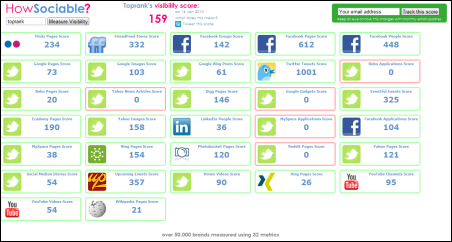
HowSociable is a useful tool to quickly gauge the social presence of a particular keyword or brand name. Agencies like TopRank Marketing will use this kind of tool (customized) to take snapshots of customer social presence metrics for social media optimization programs. For each social site polled, you can clickthrough to see specific mentions.  This is a characteristic of more advanced social media monitoring tools, but for those that want a quick glimpse, HowSocialble is easy to use and the price is right, just like these free social media monitoring tools. However, if you want more comprehensive brand search and monitoring, then a paid social media measurement tool is worth the investment.


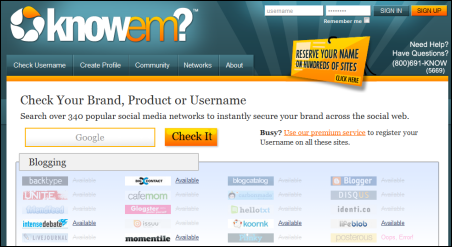
KnowEm is both a free and a paid service that will help you easily and quickly check whether your brand terms or other keywords have been registered as social profiles on a wide variety of social media web sites. Everything from blogging platforms to social news and bookmarking services are included. If you don’t want to complete all those profiles yourself, you can pay knowem to do it for you.  Companies invest a lot in building their brand, so this tool is helpful both for creating off site promotion channels as well as guarding against brand name squatters.


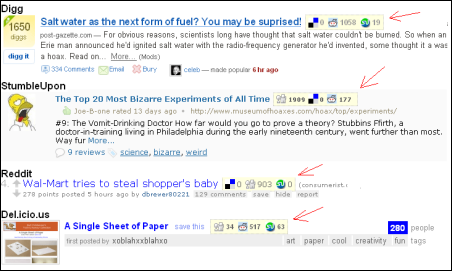
Social Media for Firefox is the only browser addon in our list and can be a handy tool to identify upcoming news items that are gaining popularity on certain social news and bookmarking services. A big part of building a more influential user profile is to be a consistent source of submissions for articles that become popular. This addon helps identify articles that are becoming popular on services like Digg, Reddit and StumbleUpon giving you a heads up to submit to other services.  The logic is that if a news item becomes popular on one service it has a good chance of becoming popular on others.  Relevance, timing and focus are key as is patience for this kind of tactic.


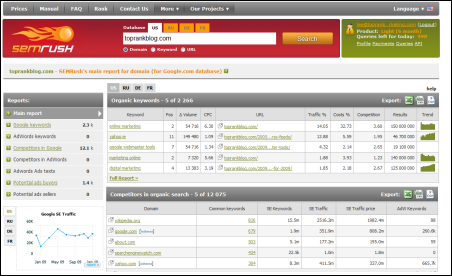
SEMRush is an interesting tool for identifying the keyword visibility, both organic and PPC, on Google for pretty much any domain name you might be curious about. Your own or competitors for example. A common question for marketers is, “What are my competitors optimizing for?”. This tool helps uncover that insight and in combination with other standard and social keyword research, can be very helpful insight in a social media optimization program.


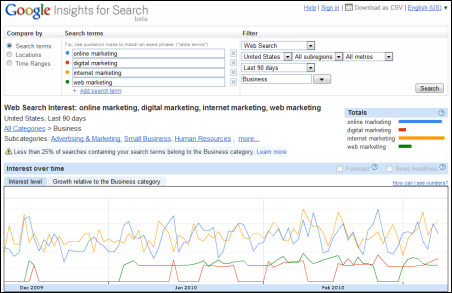
Google Insights for Search is a handy tool to research trends in popularity of various keywords on their own or in combination.  Filters for search type, geographic location, industry or topical category and timeframe allow you to refine some pretty useful information about what’s in demand.


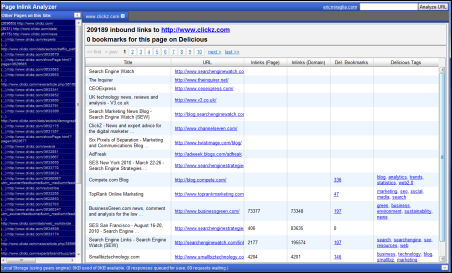
Eric Miraglia ’s Inlink Analyzer is a back link analysis tool based on Yahoo’s Site Explorer that not only counts and displays source links to a particular URL, but it also shows if the source links were bookmarked on Delicious and what keyword tags were used. This kind of insight can be quite useful for understanding the relationship between social keywords and link popularity. It would be nice if there was a CSV export option.


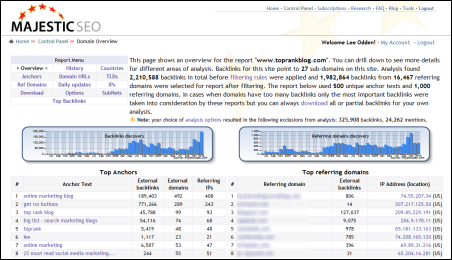
Majestic SEO is easily one of the most powerful and useful link analysis tools available. There is a free version that gives you link acquisition counts over time and if you are a site owner, you can get full reporting for your site once you validate it.  If you use the paid service, you can get the juicy link details on your competition.  This tools is useful for finding high impact links for standard SEO but it’s also useful for finding out which social media sites your site or competitors’ site are getting  the most links from.  Also, which of your own social destinations (blog, Facebook, Twitter, etc) are getting inbound links and from where.


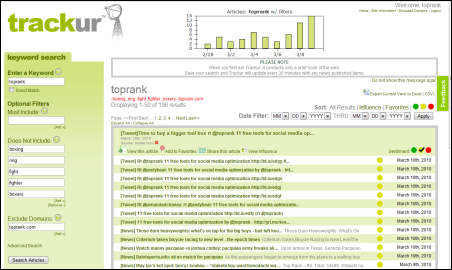
Andy Beal’s Trackur service is a very easy to use social media monitoring tool that offers a free version that will satisfy many beginners in the social media optimization space.  Social media monitoring services are keyword based, (queries and negative or exclusionary) and that means some very useful information about how popular certain keyword concepts are on the social web. Of course you can use it to monitor what people are saying about your brand, identify a certain measure of influence and where they’re saying it. But seeing social keyword popularity trends can be quite useful for taking advantage of real-time marketing opportunities.


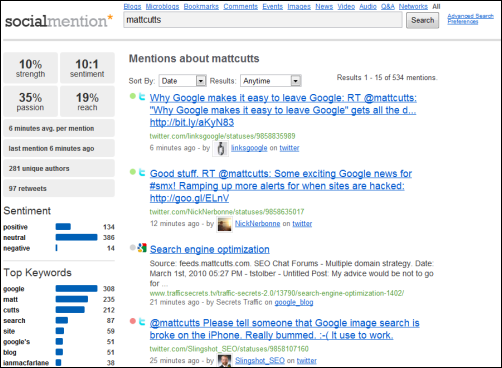
SocialMention is a free real time and social search tool that offers an array of search options (just blogs, just forums, just bookmarks or all) and output in the search results. You can get an indication of basic sentiment and the top social keywords associated with your query. As a free service, you don’t setup an account and save your search results, but you can easily download them into a spreadsheet. This is probably one of the most useful, free social search tools online.


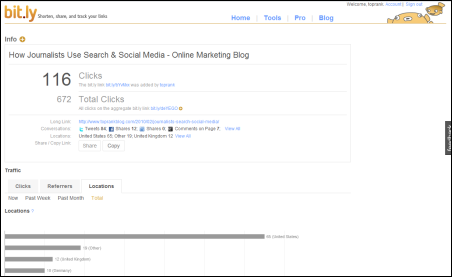
Bit.ly URL shortening is very handy since they’re included as a default service on Twitter and many other Twitter applications. Bit.ly is rock solid reliable with uptime, which is pretty critical when you’re relying on their URL redirect to send traffic to whatever it is you’re promoting. You can also get basic statistics for each URL that your shorten to show how productive the site is where it was shared.  In today’s succinct social web with Twitter, status updates and micro-content, being able to conserve space with a reliable URL shortener is very helpful. Stats on top of that make this a “go to” URL shortening service.


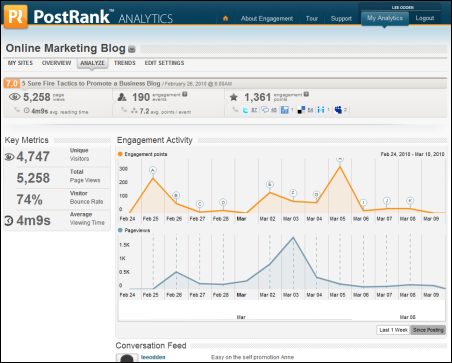
PostRank offers a nice measure of engagement at the individual document level and if you pay attention, you can get that data on any web site in their database, not just your own. You can easily see what content on your competitors blogs are getting popular and where.  If you sign up for the PostRank Analytics service, you can incorporate Google Analytics data with social engagement metrics. These are essential comparisons in a social media optimization program and can help you understand where to plan your time on the social web.
This is really just the tip of the iceberg when it comes to SEO and Social Media Marketing tools. What low cost or free tools have you found to be effective for social media optimization tasks?

Mar 5, 2010

Brandtology Social Media Monitoring

Posted by Marshall Sponder on March 02, 2010

I spoke with members of the Brandtology team over the last week – they are a one of the largest Social Media Monitoring / Online Intelligence service providers in the world (so they claim – but what is “large” in this field?) with well over a hundred employees who focus on serving  global organizations across the world.

Until recently, had no idea Brandtology existed or who they were.
In fact, if I had been looking more closely – would have noticed Brandtology was nominated for  the AlwaysOn fourth annual OnMedia Top 100 Private Companies competition under the Web and Media Analytics category.  Also mentioned Brandtology a few months ago, without really focusing on them in a post about Edelman’s TweetLevel tool – see TweetLevel – Twitter Analytics @ Edelman – my post also got picked up by Social Media Today because of the Brand Digital Index work they are doing with Edelman.
Finally, Brandtology is attending Re:think 2010, The ARF 56th Annual Convention + Expo in NYC in a few weeks – as they are a member of the ARF – I may meet with them when they are in town.
Brandtology is among the “high end” platforms  (also, one with an odd name, just like Synthesio which I wrote about the other day).  My guess is that Brandtology and Synthesio would not see themselves as  similar – and maybe they are not – both are high end platforms for large companies -  who require  precision and structure not obtainable  with self serve platforms like Radian6, Alterian, Sysomos and Brandwatch, to name a few.
Nothing against the self serve platforms – it’s more that once you get past the exploratory stage – a company might need to have data that is organized in a very specific way.  For example, many large corporations use custom metatags to drive automation and high end features of their sites – I know IBM.com does this because I worked on aspects of it when I was part of IBM’s Web Effectiveness team a few years back.    I noticed in Brandtology, aspects of their reporting that could support and work within that customization.
Also, Line of Business reputation monitoring – by country and language – not that easy to do in self serve platform – it seems to me that when you need reporting on that level – your going to have a platform like Brandtology.
Of course, everything come with a price – to get really meaningful reports with highly accurate sentiment analysis that is focused just around your Brand is going to be more costly.

The Brandtology experience is much more structured than you might be used to  -  keyword analysis being done up front (they have use of a “Workbench” tool for research that is used internally to do ad-hoc analysis that support configuration and set up of accounts) and a ticketing system that is probably more elaborate than your average vendor – but the main thing they offer that structured data – where every bit of it is verified and fully vetted before the client sees it.
As a client logs in, here’s and example of  what they first see -

As Brandtology strives to organize reputation monitoring to mirror the clients’ web presence, internationally, they are able to mirror it with a greater degree of insight – see below:

This doesn’t look much different, on the face of it, than Radian6 – a self serve tool – but there is an important difference – Radian6 doesn’t attempt to mirror your actual website in it’s selections – Brandtology, to my understanding – does.
Now, if this walk-through seems a little vague – it is -  Brandtology is very protective of it’s client list and did not want to go into too much detail - they showed me what their platform can do – but I can’t evaluate their claims since I can’t set up their system and test it myself (though I could get them to let me use WorkBench  – their internal ad-hoc query tool, but I didn’t do that)  – it just doesn’t work like that – similar deal with Synthesio.

You, the client, can drill down very atomically into the data with confidence a few people have already touched the data and make sure it’s relevant to your company and brand – obviously, Brandtology works closely with your Brand (hence the name) so they know what you want – that’s the “high end” model they use – and apparently, it must work well as they had a lot of multinational corporations based on the list I saw; they are big enough, infact, to want to be intentionally, under the radar – and that’s basically, where they are.
Drilling down to the item level – again, doesn’t look that different than any of the platforms I looked at previously – there is work-flow management to some of the other platforms like Radian6, Sysomos HeartBeat, Scout Labs now has work-flow management, Alterian/Techrigy/SM2 has it – what they lack is the human vetting – all of this data – checked and re-checked – when the Brand sees it – it’s as clean as it can be.

You can also drill down but what they term as  a “channel” and see viral growth of the messaging around your brand (hopefully, your message is growing) and you can also drill down on that growth.  By the way – based on Brandtology’s categorization – a blog is a channel and in the case of  review sites – they can be broken down to the sub channel level – again – here’s where the human interaction with the data makes the results more immediately useful to the Brand.

Talking about metrics – Brandtology has a visualization of data that is very close to the Digital Footprint Index model I wrote about last year (see A Social Media Scorecard based on Digital Footprint Index) – in fact, when I tried to create my own DFI Scorecard with data I collected from a non-profit and then chart it in 3 dimensions – I was stumped - I didn’t know how to represent changes in height/width/depth in a meaningful way based on the data I collected – but Brandtology has such a visualization (see below):

I bet Ryan Rasmussen of the Zocolo Group would be interested in this diagram above – it’s how Brandtology represented the changes in three dimensions over time – the main thing that’s missing here is an “animation” of the data – which I brought up to Brandtology as a nice to have feature they ought to develop.
I asked Brandtology to show me an “Influencer List” and here’s what they presented (below):

The “influener list” doesn’t appear much different, on the face of it, as any of the other platforms I reviewed - I pointed out that most people, when looking for Influencers – want a list of people, not blogs – along with contact information.
Similar to channel growth – but different – is “voices” growth – and this chart shows how your messaging is growing by counting a source of data (such as a blog) only once -you can say that voices chart is similar to counting unique visitors in Web Analytics.

I suppose, you can get from Brandtology an influencer list if you wanted it – just by drilling down on the voices chart (below):

To summarize this long post – I can’t tell you how well this platform works – I can’t really compare it to anything else I have used as I can not load it with my own query and compare the results. At some point to sell a platform like this – there is probably a bit of a coordinated sales and marketing  along with recommendations that are important when going after larger clients.  In their own words …..
We are one of the largest Business and Brand Online Intelligence service providers that combines technology, processes and trained professionals to deliver accurate and relevant intelligence to global organizations.
We have more than 100 Social Media Specialists in 10 locations around the world who are able to verify and enhance our automated machine analysis in more than 9 different languages. This ensures very high accuracy and relevancy of the analysis reports provided to our clients who do not have to waste a moment sieving through irrelevant data.

Brandtology has what it takes to get the job done - but in this case Nathan Gilliatt is in a better position to evaluate  Brandtology than I am (Nathan Gilliatt wrote the Guide to Social Media Analysis, the worldwide buyer’s guide to tools and services for listening to social media) and I’ll be presenting with Nathan at Monitoring Bootcamp later this month in London and at the Sentiment Analysis Symposium in New York on April 13th.


Read more: http://www.webmetricsguru.com/archives/2010/03/brandtology-social-media-monitoring/?utm_source=feedburner&utm_medium=feed&utm_campaign=Feed%3A+WebMetricsGuru+%28WebMetricsGuru%29&utm_content=Google+Reader#ixzz0hJfEJMgv
Under Creative Commons License: Attribution

Jan 20, 2010

The Ultimate List of Twitter Tools


Ad Networks

FeaturedUsers - “FeaturedUsers is a Twitter application ad network. If you’re a Twitter user, it’s a great way to get more followers and support your favorite Twitter apps. If you’re a Twitter app developer, it’s a simple way to start monetizing your application.”
Be A Magpie - Our customers sign up and create campaigns which consist of magpie-tweets (i.e. ads). Twitterers allow us to post magpie tweets among their tweets and for them to get paid for it.
TwtQpon - Generate coupons that can be distributed via Twitter
adCause - cause-based advertising via Twitter
TwitAd - another Twitter advertising network
What’s Your Tweet Worth - partner site to TwitAd; supposedly determines how much you could make via Twitad

Badges & Widgets

TwitterSalt – Show your latest tweets with a simple cut and paste line of code
TweetRoll - Show your how many followers you have and who they are
SayTweet - Create a Twitter widget that integrates a photo of your choice
Twitterati Badge - Create a javascript badge of your Twitter feed (as it appears to you, so it includes tweets from those you follow)
Twitter Widgets - The official site for Twitter Widgets, straight from the horse’s mouth
TwitterCard - generates a 125×125px badge to display your latest tweets
Twitter My Site - Custom follow icon generator
SigPad - generate dynamic email signatures that show your tweets (or flickr photos, etc.)
TwitSig - Creates a widget displaying your latest tweet
TwitIMG - shows your latest tweet
Twitter Sticker - another Twitter widget creator
Twitter Ribbon - Create a corner ribbon ad for your twitter page
TweetSnap - another widget creator
Real-Time Chatterbox - a really nice looking, customizable, keyword searchable widget
MyTweetElite - I have no idea what it does because they require you to tweet a BS message to even see the app.

Diet & Exercise

TweetWhatYouEat - Food Diary & calorie tracker
FoodFeed - Food Diary - just for fun

Entertainment

Unique and Miscellaneous:
PoopTag - Um…yeah. Just go check it out. (Totally SFW.)
Twenglish - Translate your normal, gramatically correct english into “Twitter speak”
TwtCard - send a greeting card (no login required)
TwtVite - event management service via Twitter
Tweeght - Post and vote on quotes via Twitter
Twypos - collects tweets containing Typos
Twash - A vote-able database of awesome Tweets
Unicode Symbol Map - Icons that can be cut and pasted into your tweets
GamerDNA - Share your gaming habits with your followers
Twootball - Football related tweets
innterTwitter - zen moments, brought to you by via Twitter
TweetWants - Wants that people have tweeted
TweetFAILS - A collection of tweets featuring “FAIL”
Swotter - A book posted to Twitter, 1 line a day
Thatswh.at - shows tweets that were subsequently replied to with the statement “That’s what she said”
MyTweet16 - see any Twitter user’s first 16 tweets
Tweetvalue - supposedly determines the value (in $) of your Twitter account
Twitmatic - view a real-time stream of the videos that are being shared on Twitter
TweetBeats - Some sort of heartbeat-like visualization of tweets - no explanation as to how it works though
Twistori - Gorgeous Twitter visualizer for specific words: love, hate, think, believe, feel, & wish
EveryTweet - random tweets displayed
e-Penis - how big is yours?
Hot-or-not meets Twitter:
TwittyPop - Lists the hottest Tweeps
Twit or Fit - “Hot or Not” for Twitter
TwtPets - “Hot or Not” for pets of Tweeps.
Games:
Whose Tweet? - Quizzes you on which of your friends tweeted a phrase
Twrivia - tweets a daily trivia item
ouTwit Me - some sort of quiz game…Can anyone explain?
The Twitter Tag Project - Like Facebook pokes, but for Twitter
LOLwrus - tweets + flickr photos = roll your own LOLcatz
Twitchance - an actual, Twitter-based lottery (not sure of the legalities, but…)
Dream-related tools:
DreamTweet - Anonymously post your dreams to Twitter
TweetDreams - Not so anonymously shows a feed of tweets mentioning dreams
Visual Interfaces for Twitter (of the entertaining ilk):
Twoogie M.D. - Doogie-style interface for Twitter
Twitter Magnets - Mashup of Twitter and fridge magnets

Groups

Unique and Miscellaneous:
TweetChat - allows you to focus on a specific hashtag group by limiting your stream view to just that topic
SXSW 2009 Twitter Visualizer - created by Pepsi? Very cool though…
Helveti-Tweet - collects all tweets regarding Helvetica
Group Tweeting Tools:
ConnectTweet - Collect related tweets into a single account - allows multiple people to tweet to one account
Social: Twitter for Events & Groups - create an event username and all guests can tweet to that account from their own username
GroupTweet - Create a Twittername for your group and then everyone who is following & followed can message to the group via DM
TweetParty - group your followers and send DM’s to groups
Group Directories (brands, interests, celebs, etc.):
Twitter Groups - directory of Twitter groups
Top Follow Friday - Twitter directory for #FollowFriday reccomendations
Follow Friday Statistics - Another #FollowFriday directory
ThinkClimbing - Directory of tweeting climbers
Tracking Twitter - list of brands, media tweeps, celebs, & TV tweep on Twitter
Social Brand Index - list of brands on Twitter
TwitterPacks - find new people in these groups by topic, location, etc.
Pornstar Tweet - A Twitter stream specific to tweeting pornstars
Celebrity Tweet - A Twitter stream specific to tweeting celebs
WeFollow - new directory of tweeps by Kevin Rose; put yourself into the system then find others with similar interests
Qapture - shows feeds for the “top” people in design, strategy, and advertising categories
ExecTweets - directory of the top business Twitterers by category
Twitter Customer Service - The ultimate list of Stores on Twitter (great list!)
Actors, Directors, Screenwriters on Twitter
Topic-based tweet grouping tools:
TweetWorks - View tweets by topic group or threaded discussion view
Tweetizen - Collects Tweets by topic

Follower Management

Unique and Miscellaneous:
Tweeter Tags - Tag your profile with relevant interests/keywords and search for others to follow via tags
Twitter2FF - syncs your Twitter and FriendFeed contacts
MrTweet - Finds relevant people for you to follow and shows who follows you that you don’t follow in return
New Follow Notify - Auto-DM’s your new follows a questionaire (probably not a good idea…)
Twalala - filter tweets out of your stream by keywords and phrases or mute individuals who get a bit too chatty
Follow Cost - “How annoying will it be to follow _____ on Twitter?”
Mr. Milestone - notifies you every 100 followers reached (100, 200, etc.)
Twitnest - Interesting visualization of your followers and theirs
Twittersnooze - unfollow and then automatically refollow your tweeps for a present period of time
Twimailer - sends a beefed up email regarding new followers
Tweeple Twak - in private beta right now…so I don’t know exactly what it does
Top Twitter Friends - interesting visualization of your Twitter network
Twibes - like #followfriday for any day of the week; recommend 10 friends that your network should follow
TwerpScan - analyzes your followers based on some cool algorithm thingy
Bulk management tools:
My Cleaner - Helps clean out people you follow who’ve been inactive for quite a while
Twitter Karma - bulk management of followers and those you follow
UnTweeps - bulk management of tweeps who haven’t posted in 30, 60, or 90 days
Tweepler - Follow/Ignore new followers
TweetSum - Vet recent followers via a drag & drop system
Twitoria - Twitoria finds your friends that haven’t tweeted in a long time so you can give them the boot!
Mutuality - bulk unfollow tool for people not following you back
FlashTweet - another bulk management tool
Tools to show which tweets lost/gained followers:
Tweet-Rank - shows which tweets you gained or lost followers on (didn’t work for me, but it’s in German which I don’t read, so it may have been user error)
TweetEffect - shows which tweets you gained or lost followers on (Seems suspect IMO)
Qwitter - Sends an email letting you know when someone quits following you, and after what tweet (many, including myself, have had trouble with Qwitter lately…)
TwitterLess - Lets you know when someone stops following you; also graphs your follower trends over time; still waiting for this one to kick in for me…
Find new followers based on who your friends follow:
Twubble
Who Should I Follow?
Find new followers based on a keyword search:
Twitseeker
Tweetfind
Twellow
TweetBurn - find people to follow based on the topic they’re talking about
Twollow - auto-follow tweeps who’s tweets include a keyword of your choice
Twollo - not to be confused with the above, but it does the same thing…
TweetPenguin - follower recommendation based on interests - creates a “lineage chain”
Who’s following who tools:
DoesFollow - very simply: “Does ____ follow ____?”
Friend or Follow - Who are you following that’s not following you back? Who’s following you that you’re not following back? Find out!
TweepDiff - compares the followers of two tweeps
Who Follows Whom? - A grammatically correct checker for up to 5 Tweeps at a time
TwtrFrnd - Find what followers two tweeps have in common
Tools for gaining new followers (of questionable value, IMO):
Hummingbird - auto-follow tool that costs $200
TweeterGetter - pyramid scheme for getting Twitter followers
I Follow Back - pyramid-scheme-ish system for gaining followers (you sign up and agree to follow at least 90% of those who follow you)
TweepMe - Another “I follow you, you follow me” scheme

Ranking Systems

ReTweet Rankings:
ReTweetRank - a system for ranking based on retweets
ReTweetist - see your ReTweet rank
ReTweetability Index - another ReTweet ranking system
Rank your Friends:
FavTwits - Find out who you’ve been talking to on Twitter
TwitTangle - customizes your timeline based on your ranking and tags of those you follow
Tweeterate - Rank/rate tweets from your tweeps
Evaluation Tools:
TweetActive - find out how active you and your friends are on Twitter
Twitter Score - Evaluates your Twitter Popularity
Tweetwasters - estimates the amount of time you’ve spent on Twitter and ranks you against other tweeps
Twitter Grader - one of the better ranking systems out there; also offers people you should follow
PlusPlusBot - aka TwitterKarma; difficult to understand, but apparently it works
Happy Tweets - ranks the happyness quotient of tweeps’ tweets
Twitterholic - yet another
Favorited Tweet Tools:
fav.tweets - all of any Twitter user’s favorited tweets
Twitfave - see which of your tweets have been faved and by whom

Location-based Services

Map Tools:
TweetMapper - Map your Tweets
GeoTwitter - A simplistic Twitter + Google Maps mashup
Atlas - Twitter and MS Virtual Earth mashup
TwitterVision - another Twitter/map mashup; nice looking
TwitterMap - yet another
Mmmeeja - plot your followers on a map
Find Tweets/Tweeps by Location Tools:
Chirp City - breaks down tweets by geographic areas
Twellowhood - find people to follow by geography
TwitterSPY - Tweets by location
Twuzzer - Find tweets from your neck of the woods
SadakMap + Twitter - another location-based Tweet app
Weather Tools:
Twitter Weather - Weather forecasts via Twitter

Personal Finance

TweetWhatYouSpend - finance management tool for Twitter (if you want to put all your expenditures online…
Xpen$er - tracks your spending via any mobile input mechanism (including Twitter)
TipJoy - Send $ to tweeps via Twitter
StockTwits - sharing stock/finance info via Twitter

Productivity & Sharing

Unique & Miscellaneous:
Twe2 - allows receipt of Tweets via SMS in Europe (among others)
Postica - Create and send sticky notes via Twitter
Twiggit - lets your Twitter followers know what articles you’ve Dugg (Digged?)
TrackThis - Package tracking via Twitter
TweetReplies - your @replies delivered to your email
Tweet O’Clock - Find the best time to tweet someone
Fuel Frog - track your gas mileage and fuel consumption
CheapTweets - deals, coupons, bargains, and sales via Twitter
TwTip - compiles tips shared on Twitter
TikiTwit - Syncs Twitter with your iChat status
Topify - Email service that allows replies, DM’s, and follows via email
Twollars - Twitter-based economy. Give twollars for things you dig, get twollars for things you say. Donate twollars to charities who will really get money for them
TwitterJobSearch - searches twitter for job listings based on your search terms
Tweleted - recover deleted Twitter messages
BakerTweet - Physical computing meets Twitter in the kitchen; alert system for bakeries from the folks at POKE
Twitter-based classifieds:
iList Micro
TwtMarket - post what you need or what you’ve got - Craigslist meets Twitter
Crowd-sourcing tools:
twAnswers - crowd-sourced answers to questions from the crowd
TwitHelp - crowd-sourced help from the community
Twitter Pigeon - Ask a question via Twitter and compile the answers into a single page
QuoteURL - group tweets from different people into a single page and share that page via permalink
TwttrStrm - Another ask a question, compile the answers app
Twitrans - Translate statements to another language with the help of a real person!
Link-related Tools:
Please ReTweet - adds a small retweet link to your tweets
TweetBurner - clickthrough tracking for your Twitter URL’s
TweetMyLink - Share and find links via Twitter
LinkBun.ch - Like TinyURL, but for multiple URL’s at once
TwittURL’s - Tracks the most tweeted links
TweeTube - Easy sharing of Youtube vids via Twitter
TweetMeme - Awesome, Digg-like service for Twitter
MicroPlaza - really nice link listing for links shared by all your friends
To-Do List Tools:
Twit2Do - Manage a to-do list via Twitter
TwTask - another Twitter to-do list app
RetweetMe - schedule reminders to hit you via Twitter
Poll Creation Tools:
TwtPoll - Send polls via Twitter
StrawPoll - Twitter polling
PollDaddy - another polling service
File-Sharing Tools:
Acamin - file sharing via Twitter (files up to 15MB)
TweetCube - file sharing via Twitter
FileSocial - file sharing via Twitter
Twitter Background Tools:
Twitter Gallery - Easy to install Twitter backgrounds
TwitBacks - free Twitter backgrounds
Wishlist Tools:
Twishlistter - create and share a wishlist via Twitter
TwtWlst - Create a gift registry/wishlist via Twitter
Tweetmas - holiday wishlist powered by Twitter
Twitter “Walls”:
Twitwall - blog-like companion to your Twitter account
MessageDance - Like a portable Facebook Wall
Goal-related Tools:
21Tweets - Helps you form a new habit over the course of 21 days
TrackDailyGoals - Goal management via Twitter
Comment Tools:
Twonvo - Threaded view of your Twitter conversations
Twickie - archive comment strings from Twitter
Tweader - allows nested views of Twitter convos

Posting Tools

Unique & Miscellaneous Tools:
Twoxit - put a form on your site for anyone to tweet from
Twickly - lets you create a set of pre-recorded tweets for quick posting
PingVine - posts an Atom or RSS feed to your Twitter stream
SecretTweet - Anonymous tweeting; like PostSecret on Twitter
Post Like A Pirate - name pretty much says it all
Twappi - Finds someone who needs cheering up for you to tweet at
TwitterLights - highlight interesting bits from the web and tweet them from there
PleaseRT Me - adds an auto-RT link to the end of your posts
Twuulu - posts what you’re watching on Hulu for your Tweeps to see
Long-form Tweet Tools:
Twerbose - allows users to post long tweets and then links to them in twitter
Twonvert - Converts long-form tweets into 140 characters
140it - Condense long tweets down to 140 characters
Twitzer - plugin/hack that allows for longform Tweets
Scheduled Post Tools:
TweetLater - allows follower vetting for multiple accounts as well as scheduling auto-tweets and auto-DM’s
Twittertise - Allows advanced scheduling of Tweets. Also measures click-through rate of included URL’s!
FutureTweets - schedule tweets to occur in the future (including recurring tweets)
Web-based Dashboards:
Followize - web-based app for posting and reading tweets
HootSuite - manage multiple Twitter accounts from one dashboard
Tweet3 - manage multiple Twitter accounts
TweetVisor - web-based Twitter dashboard
TwitExplorer - web-based Twitter dashboard
EasyTweets - another Twitter dashboard
Twiddict - posting system that will hold tweets if Twitter is down and post when it comes back up
TweeTree - posting dashboard that allows nested view of conversations
NutshellMail - web-based dashboard that provides access to Twitter and other networks
Accessible Twitter - Easy to use dashboard - only allows mgt. of one account at a time
Blog Tools:
Twittinesis - pushes your tweets to your blog
Tweetly - auto-posts Twitter updates when you post a new Wordpress entry
LoudTwitter - posts your daily tweets to your blog
TweetRemote - lets you decide what tweets get reposted to your blog and insures that they look good when that happens.
Tweet via email Tools:
TwitterMail - Send tweets via email
EmailTwitter - Send and receive tweets via email
Travel-related Posting Tools:
Vacatweet - Twitter auto-responder for when you’re on vacay via @reply or DM
twtTRIP - tweet your travel plans

Music

Twt.fm - Tweet songs directly in your Twitter Stream
Song.ly - Music sharing via Twitter

Photo Tools

MobyPicture - allows sharing of photos/videos from your mobile to Twitter (and other networks)
TwitPic - Post photos to Twitter (primarily for mobile use)
SnapTweet - share flickr photos on Twitter
PicPostr - Photo sharing on Twitter from your mobile (via email)
Portwiture - Grabs flickr photos that are relevant to your latest tweet
VisualTwitter - “What are you doing?” answered in photos only
2Tweet - Tweet multiple photos and vids via email

Search Tools

Search.Twitter.com - The one, the only, the official Twitter Search
FreeSearch - Hunt people down across the web and get the results via Twitter
Green Tweets - Green Tweets uses semantic language analysis to identify tweets pertaining to green issues from the public Twitter stream.
TweetJobSearch - Find job listings on Twitter
Tweetag - browse Twitter based on a keyword search
TweepSearch - find people
Spy - up-to-the-minute search tool
TweetGrid - allows you to create a grid view of search returns
Monitter - an embeddable search return form (the only embeddable one I’ve noticed)
Cloud.li - Really interesting search that allows you to exclude terms
Icerocket - Twitter search with links to prepopulated replies
Flaptor - simple, clean search interface
Backtweets - VERY COOL! Search a URL and get the people who have linked to it on Twitter
Keyword Notification Tools:
TweetScan - scans Tweets for keywords and emails you the results periodically
Twilert - email notification of tweets containing keywords of your choice
TweetBeep - keyword notification
Twitter2Mail - monitors search.twitter.com and sends @replies directly to you via email
Authority-based Tools:
Twithority - search Twitter by tweeps’ authority ratings
Twitority - search Twitter by tweeps’ authority ratings

Topic Trends

Top News Trends - Cross references Google Trends with Twitter for late-breaking news info
PicoBuzz - Tracks the latest trends in the public timeline
Twispot - Tracks popular topics on Twitter
Popular Tweets - shows the 10 most popular Twitter topics based on hash tags
Twopular - trends over the last hours/days/weeks/months
Twitscoop - another tag cloud tracker
Tinker - event discussion tracker
Graphic/Visual Representations of Trends:
Twist - graphic visualization of trending topics
Tweet Cloud - tag cloud visualizer of popular topics
Twitterfall - waterfall-like view of latest Twitter trends
Vlaag - another tag cloud style trend tracker
Twitter Cloud Explorer - another cloud tracker
ReTweet Related Trend-Watching Tools:
ReTwitd - tallies the most retweeted links by time period
ReTweet Radar - looks specifically at ReTweet trends

Statistics

Tweetstats - great visualization of your Twitter habits
Twitter Analyzer - another stats app
Twitter Venn - compare Twitter search terms in a Venn Diagram
My Twitter Weighs a Ton - see your most popular Twitter terms
Twitalyzer - interesting stats package that’s social media oriented
Twitter Thoughts - visualization mashup for topics
TwitterCounter - graphic representation of your followers over time
Twinfluence - a quick app that measures (and explains!!) your reach, velocity, and social capital on Twitter
Twitter Charts - visualizes your tweets by day of the week and time of day
Social Collider - Really interesting visualization of your posts - not sure the value, but it’s a great infographic.

Twitter Backup Tools

Tweetake - backup your tweets
TwitterSafe - backup your tweets again

Twitter Desktop Clients

Twhirl
TweetDeck
Twitterific
Destroy Twitter
Tweetr
Snitter
Spaz
AlertThingy - Updates Twitter, Facebook, Flickr, Tumblr, Yammer, etc.
Sideline - search-specific air app from Yahoo (I never got it to work, though it looks pretty)

Mobile Clients

Primarily Windows Mobile:
ceTwit
Twitter Answers
GPS Twit
Quakk
TwitToday
Pocketwit
Twitter2Go
Primarily iPhone:
Tweetie
Twitterrific
Twittleator
Hahlo
iTwtr
PocketTweets
TwitterFon
ReTweet - RT specific app for iPhone
Primarily for the G1:
Twidroid
Twitli
TwitterDroid
Primarily for Blackberry:
Blackbird
TinyTwitter
TwitterBerry
For other phones:
Titxr
MoTwit
JibJib
jTwitter
Psychzzz
Twim

Firefox Tools

FriendBar
TwitterLine
Twitter StatusBar
Twitter Toolbar
TwitBin
TwitKit
TwitterBar
TwitterFox
Tweetpkr - really nice looking FF widget

Facebook Tools

(found on RotorBlog)
TweetSync - syncs your tweets with your status
Twitter App - from the folks at Twitter; your standard bread and butter app
Twitter Updater - Tweets your FB status (instead of statusing your tweets)
Selective Twitter Status - allows you to select which tweets go to FB by appending #FB
@Tweeter - two way street between FB and Twitter, update either
Twittervision - FB specific edition of the app listed above; allows location sharing
TwitterScore - some sort of ranking game
Grazr - a FB based Twitter reader that lets you explore your tweeps
Web Presence - collects all your social media stuff into FB
Fwitter - Twitter to FB status tool