Showing posts with label measure. Show all posts

May 9, 2010

60% of US marketers reporting they measured performance in click-throughs

MAY 7, 2010 

ROI lags behind in measurement


Online marketing has been touted for its measurability, a quality that should make it easy for marketers to determine effectiveness and value for money. Despite widespread recognition that the click-through does not measure the full effect of an online ad—even ones placed with direct response objectives—and calls for better branding metrics, many marketers still rely on the easy-to-track click as their top performance metric.
A March 2010 survey by Chief Marketer showed the click remained on top, with 60% of US marketers reporting they measured performance in click-throughs. Fewer than two-fifths measured overall return on investment (ROI).

Metrics Used by US Marketers to Measure Interactive Marketing Performance, March 2010 (% of respondents)

Those responses were similar to the 2009 edition of the same survey, and Chief Marketer suggested respondents were sticking with “old-school metrics” while paying lip service to the importance of ROI.
Similarly, Collective reported that in February 2010, click-throughs were the most common measurement of ad network performance, used by 64% of responding advertisers.
Datran Media found in December 2009 that marketers worldwide considered conversions the most important success metric, with nearly 90% saying it was “very important.” Click-throughs were rated important by 56.7% of respondents. But when Datran asked what types of measurement marketers actually used, clicks came out on top, with 72% of respondents tracking them.
These measurement practices left one-quarter of respondents to the Chief Marketer survey unsure whether interactive campaigns produced greater ROI than traditional marketing efforts.
The CMO Council’s “State of Marketing” survey did not ask about click-throughs specifically, but found marketers worldwide were most likely to measure their campaigns through page views, registrations, and the volume and origin of site traffic.

Methods Used by Marketers Worldwide to Measure the Effectiveness of Online Marketing/Advertising Campaigns, 2010 (% of respondents)

Asked about their online marketing performance measurement ability, the plurality of respondents to that survey (44%) were either working on increasing their capabilities or “struggling” to put a value on their interactive spending.
“Marketers’ familiarity with clicks is only one factor that contributes to its continued usage as the top metric,” said David Hallerman, senior analyst at eMarketer. “Click are easy to count, too, and therefore an inexpensive metric to gather.
“In contrast,” Mr. Hallerman said, “measuring either brand effectiveness or the indirect effects of online ads—such as how display ads contribute to search clicks—is more complex and typically costs more to accomplish that just tallying up clicks.”
Keep your business ahead of the digital curve. Learn more about becoming an eMarketer Total Access client today.
Check out today’s other article, “When to Respond to Negative Buzz.”

Apr 7, 2010

avatar 0 0 votes Share 36 Twitter Resources: Advanced Twitter Search for Business

by Coree Silvera on 04/06/2010 

Whether you decide to engage in social networking as a marketing strategy or not, Twitter has become a powerful tool to search and monitor your brand, your competitors, and for lead generation.  Beyond the basic search on the Twitter home page you can use advanced search techniques to produce targeted information not easily found in a normal Google search.
Want to know who’s talking about buying a new TV in Seattle?  How about people discussing the terrible customer service they received from one of your competitors?  Are you a journalist that needs case studies to report on?  Whatever you’re looking for, chances are you can find the answer in real time and target that information for whatever area  you like.
Below I’ve put together some of the best resources on using Twitter as a powerful tool to build and monitor your business:

Twitter Tools To Have On Hand

Twitter Search Operators

Articles for Improving Twitter Search Skills

Twitter Research and Monitoring Tools

  • 15. TwitterGradr – Hubspot’s tool for finding “elite” Tweeters based on location and influence.
  • 16. Monitter – Lets you “monitter” the Twitter world for a set of keywords and watch what people are saying in a grid layout.
  • 17. TweetStats – Graphs out Twitter habits based on how often, what time of day, and @ replies for you or any user.
  • 18. TweetBeep – Great for online reputation management, catching all your @replies and @mentions, finding job/networking opportunities.
  • 19. Twitscoop – Full feature Twitter web client with search, trends, and real time buzz.
  • 2. What The Hashtag -The user-editable encyclopedia for hashtags found on Twitter, allows print outs of hashtag transcriptions, Greasemonkey script adds, and Firefox add on.  Track popular and trending hashtags.
  • 21. Hashtag.org – Tracks the frequency that a hashtag is used on Twitter and provides details about the hashtag

Twitter Directories

Geolocation Twitter Tools

  • 29. GeoFollow – Large location based Twitter Directory, find and follow by city, state, zip or tags.
  • 30. Trendsmap – Real-time mapping of Twitter trends across the world.
  • 31. LocaFollow – Search by location & follow (allows bulk follow) LocaFollowis powered by Google so  results are shown in the same order that Google shows it. Those Twitter pages that are better SEO optimized will appear on the top.
  • 32. TPS – the Tweet Positioning System, is a geo-location filter for conversations and mentions on Twitter.
  • 33. GeoTwitTrends – Shows real-time trending topics happening in specific places.
  • 34. GeoChirp - Set the location and then search for tweets based on keywords.  All results from that location would be displayed.
  • 35. Twittori – Allows you to follow places in a similar way than you are used to following users on Twitter as well as attach your tweets to a specific location.
  • 36. TweetMondo - Shows Twitter users that have either registered in Tweetmondo.com or were crawled by their crawler and filtered by location.
Twitter’s advanced search is a business owner’s best friend if you just take the time to use it.  Be sure to bookmark this post for future reference to come back to!
What did I miss?  Do you have a Twitter search tip or resource to add to the list?  Share below in the comments.

Mar 28, 2010

When Conversion Rate Isn't Enough

Posted by Dr. Pete on March 24th, 2010 at 7:28 pm Analytics


The history of web analytics has read a bit like the quest for the Holy Grail. We've gone through a list of candidates searching for the one true metric: Hits, Page Views, Visitors, Unique Visitors... stopping at each one to admire its purity and virtue while denouncing the heresy of whatever metric it replaced (usually, one whose purity and virtue we were just praising the week before).

While drinking from the wrong Grail in analytics won't melt your face like the bad guy in Indiana Jones 3, you may wish for some face-melting when you have to tell your boss how much money your bad conclusions just cost the company. This post will help you get control of your unhealthy obsession with Conversion Rate and avoid the most costly traps.

Conversion Rate Crash Course

Let's start with some basics, both for the newcomers and because the industry doesn't always agree on how to define terms:
conversion rate definition
There are many variations on conversion rate, and "Action" can mean just about anything – a click, a form submission, an RSS subscription, an actual sale – but let's keep it simple for now. So, let's say that for February your site received 10,000 visitors, and 450 of them took action:
conversion rate scenarious
Pretty simple, right? Don't get me wrong – conversion rate is powerful, and it captures an important bottom-line measurement. Problem is, it's just one number (well, ultimately, two numbers). So, what's missing? To answer that question, I'd like you to consider three scenarios...

Scenario 1 – Sacrificing Traffic

This is a situation that comes up frequently in PPC management – cutting traffic to raise your conversion rate. Here are a few examples to illustrate the point:
All three of these cases have 5% CR, so they're all the same, right? Of course not - all else being equal, anyone in their right mind would pick (C). Where people get into trouble is when they over-optimize for CR at the expense of traffic.
For example, let's say you have a classic PPC scenario: (A) a campaign targeting branded keywords with low traffic and high CR, and (B) a campaign targeting product keywords with high traffic and low CR. Your client starts complaining about low CR, so what do you do? You cut spending in Campaign (B). CR goes up, but the unfortunate side effect is that traffic goes down and overall Actions (read that "sales") go down with it.
SOLUTION:
Pay attention to both conversion rate and overall leads or visitors. Once you collapse down to CR, you've lost the top and bottom numbers and are left with just a ratio. If you're a PPC manager, set an acceptable Cost-Per-Action (CPA). Traffic within your CPA limit may be worth going after, even if CR isn't ideal – traffic that costs more than your acceptable CPA may have to be sacrificed. Don't just start chopping visitors to see CR go up.

Scenario 2 – Dropping Prices

Want the secret to increasing conversion? Cut your prices in half. What's that? You say you'll make a lot less money that way? Yes, you probably will. Of course, you'd never do anything that radical, but many people create sales, price pressures, and information architectures that drive people to the cheapest product. This can boost CR but cost you money.
Let's look at an example – say you get 1,000 visitors per day, and experiment with pushing a cheaper product ($29) over a more expensive product ($99) to boost CR:
Looking at the CR, it's great news: you doubled conversion. Unfortunately, your revenue also dropped 40%. There may be times when you're willing to make this trade-off to draw in new customers, but make sure you have all of the information you need to make that business decision.
SOLUTION:
If you make a change that could drive visitors to lower-priced items, make sure you track not only CR but also changes in the average purchase amount. If you're running an A/B testing scenario, consider tracking the mean or median purchase for both groups (use the median if your products span a wide price-range).

Scenario 3 – Losing Loyalty

An aggressive push to drive short-term conversion, including the pricing scenario above, could also lead to a drop in long-term revenue and customer loyalty.  If you offer a sweetheart deal that pulls in new customers, it's possible that they'll take advantage of that deal and disappear forever. Today's Conversion Rate gain, if it's driven by bargain hunters or impulse buyers, could be next month's Conversion disaster.
That's not to say that sales and short-term incentives are never a good idea. Driving traffic in the front door is essential to building long-term relationships. The core point is that, whenever you take an action that may change the quality of your customers (and not just the quantity), you need to look at the big picture.
SOLUTION:
These metrics are a bit beyond the scope of this post, but there are a number of Key Performance Indicators built around repeat buying and the lifetime value of a customer.  Whenever you pursue a short-term strategy, don't just measure CR, measure whether those new buyers are one-hit wonders or have real staying power.

It's Still Pretty Good

I don't want to sound like I'm bashing Conversion Rate. I use it every day and have driven real, bottom-line improvements for clients based on CR metrics. We just have to remember to never get so enamored with one metric that we neglect the big picture. Every web metric that has ever existed or ever will exist is missing some critical piece of information for some set of situations and has the potential to lead us astray. Think about your objectives, think about the possible outcomes, and most of all, think about all of the analytics tools you need to see that big picture.

Mar 19, 2010

11 Free Tools for Social Media Optimization

48 Comments and 962 Reactions | Posted by Lee Odden on Mar 10th, 2010 in Online Marketing, SEO,Social Media


Plenty of bloggers are talking about the inevitable intersection of social media marketing and search engine optimization. Heck, we’ve been blogging about SMOsince 2006! Keyword optimized social content and channels of promotion provide abundant signals to search engines for improved visibility on standard, social and real-time search.
The changing nature of social media marketing and optimization create the need for tools whether for research, marketing and promotion or analytics. Here are 11 social media and SEO tools you might find useful:
Below are screen shots of each tool with a more detailed description of how you might use them.


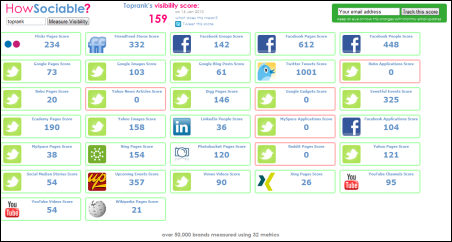
HowSociable is a useful tool to quickly gauge the social presence of a particular keyword or brand name. Agencies like TopRank Marketing will use this kind of tool (customized) to take snapshots of customer social presence metrics for social media optimization programs. For each social site polled, you can clickthrough to see specific mentions.  This is a characteristic of more advanced social media monitoring tools, but for those that want a quick glimpse, HowSocialble is easy to use and the price is right, just like these free social media monitoring tools. However, if you want more comprehensive brand search and monitoring, then a paid social media measurement tool is worth the investment.


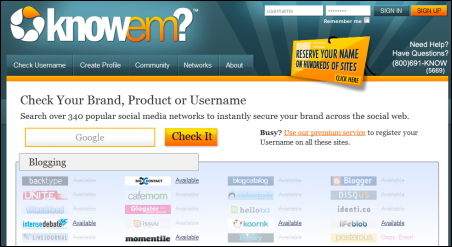
KnowEm is both a free and a paid service that will help you easily and quickly check whether your brand terms or other keywords have been registered as social profiles on a wide variety of social media web sites. Everything from blogging platforms to social news and bookmarking services are included. If you don’t want to complete all those profiles yourself, you can pay knowem to do it for you.  Companies invest a lot in building their brand, so this tool is helpful both for creating off site promotion channels as well as guarding against brand name squatters.


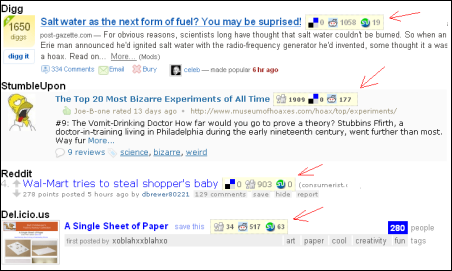
Social Media for Firefox is the only browser addon in our list and can be a handy tool to identify upcoming news items that are gaining popularity on certain social news and bookmarking services. A big part of building a more influential user profile is to be a consistent source of submissions for articles that become popular. This addon helps identify articles that are becoming popular on services like Digg, Reddit and StumbleUpon giving you a heads up to submit to other services.  The logic is that if a news item becomes popular on one service it has a good chance of becoming popular on others.  Relevance, timing and focus are key as is patience for this kind of tactic.


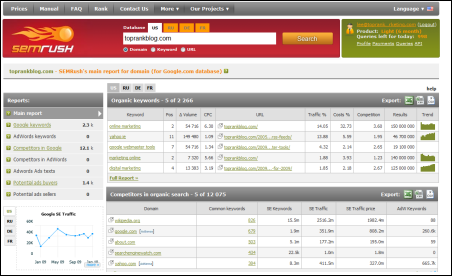
SEMRush is an interesting tool for identifying the keyword visibility, both organic and PPC, on Google for pretty much any domain name you might be curious about. Your own or competitors for example. A common question for marketers is, “What are my competitors optimizing for?”. This tool helps uncover that insight and in combination with other standard and social keyword research, can be very helpful insight in a social media optimization program.


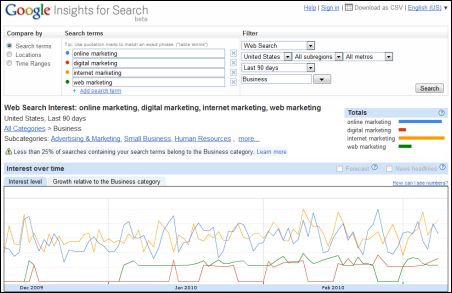
Google Insights for Search is a handy tool to research trends in popularity of various keywords on their own or in combination.  Filters for search type, geographic location, industry or topical category and timeframe allow you to refine some pretty useful information about what’s in demand.


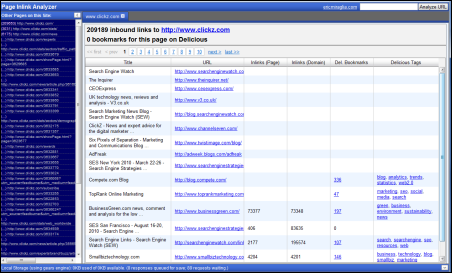
Eric Miraglia ’s Inlink Analyzer is a back link analysis tool based on Yahoo’s Site Explorer that not only counts and displays source links to a particular URL, but it also shows if the source links were bookmarked on Delicious and what keyword tags were used. This kind of insight can be quite useful for understanding the relationship between social keywords and link popularity. It would be nice if there was a CSV export option.


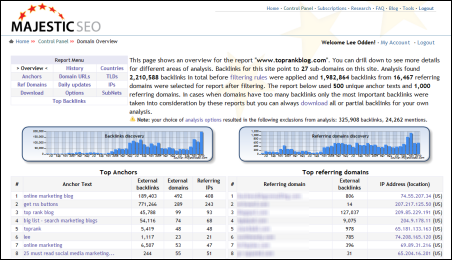
Majestic SEO is easily one of the most powerful and useful link analysis tools available. There is a free version that gives you link acquisition counts over time and if you are a site owner, you can get full reporting for your site once you validate it.  If you use the paid service, you can get the juicy link details on your competition.  This tools is useful for finding high impact links for standard SEO but it’s also useful for finding out which social media sites your site or competitors’ site are getting  the most links from.  Also, which of your own social destinations (blog, Facebook, Twitter, etc) are getting inbound links and from where.


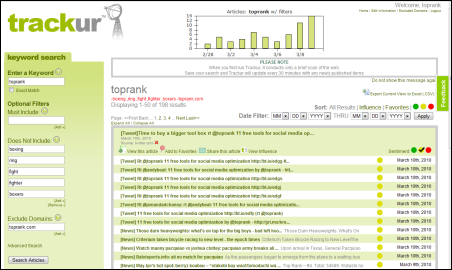
Andy Beal’s Trackur service is a very easy to use social media monitoring tool that offers a free version that will satisfy many beginners in the social media optimization space.  Social media monitoring services are keyword based, (queries and negative or exclusionary) and that means some very useful information about how popular certain keyword concepts are on the social web. Of course you can use it to monitor what people are saying about your brand, identify a certain measure of influence and where they’re saying it. But seeing social keyword popularity trends can be quite useful for taking advantage of real-time marketing opportunities.


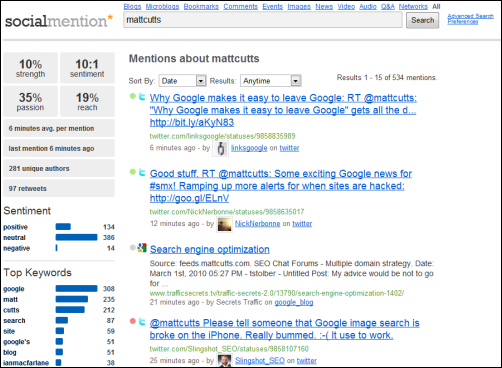
SocialMention is a free real time and social search tool that offers an array of search options (just blogs, just forums, just bookmarks or all) and output in the search results. You can get an indication of basic sentiment and the top social keywords associated with your query. As a free service, you don’t setup an account and save your search results, but you can easily download them into a spreadsheet. This is probably one of the most useful, free social search tools online.


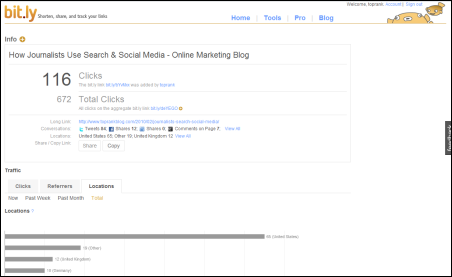
Bit.ly URL shortening is very handy since they’re included as a default service on Twitter and many other Twitter applications. Bit.ly is rock solid reliable with uptime, which is pretty critical when you’re relying on their URL redirect to send traffic to whatever it is you’re promoting. You can also get basic statistics for each URL that your shorten to show how productive the site is where it was shared.  In today’s succinct social web with Twitter, status updates and micro-content, being able to conserve space with a reliable URL shortener is very helpful. Stats on top of that make this a “go to” URL shortening service.


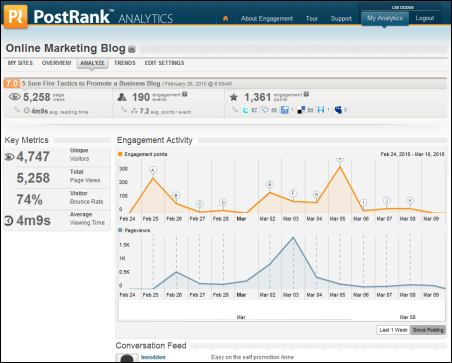
PostRank offers a nice measure of engagement at the individual document level and if you pay attention, you can get that data on any web site in their database, not just your own. You can easily see what content on your competitors blogs are getting popular and where.  If you sign up for the PostRank Analytics service, you can incorporate Google Analytics data with social engagement metrics. These are essential comparisons in a social media optimization program and can help you understand where to plan your time on the social web.
This is really just the tip of the iceberg when it comes to SEO and Social Media Marketing tools. What low cost or free tools have you found to be effective for social media optimization tasks?

Jan 28, 2010

Word of mouth: measuring the share value of your brand and messaging

Posted by Nicole Green on 01/20/10


Quick – think about the last recommendation you shared. Maybe it was an amazing book or a movie? Maybe it was that new gluten-free brownie mix? Maybe it was a coupon you posted on your Facebook wall (when Teach For America, partners with The Gap for their annual Give & Get campaign, I forward the 30% off coupon to over 1,000 people)?
For women, sharing information (recommendations, experiences, advice) is important, but certainly not a purely altruistic act. Information is social currency. And while exchanging information is faster and easier than ever (copy, paste, click), information as social currency isn’t new. From medieval soothsayers to Gossip Girl, the woman in the know is the woman worth knowing.
But it’s not a numbers game. She’s only as “good” as the information she shares, and she’s highly selective. Before she “hits” send, she makes a rapid, but a critical calculation – one that determines if you’re sent or deleted.
We call this “share value.” And share value has never been more important now that the amount of information women have access to and their potential reach – thousands in a single click – have exploded. There are several factors women use to determine the share value of a ______________ (fill in the blank: brand, message, product, promotion, web-site, event). You can use this list to help evaluate the share-value of your current messaging or offering.
Here’s how to ensure your message is S.H.A.R.E.D.
  1. Save. Does the information offer her the opportunity to save or earn money? Helping others save money pays big dividends toward her own social value. But beware – women are digging for even deeper savings – women tell us 10% and free shipping offers don’t do it.
  2. Hurry. Urgency means more than a limited-time offer. Give her a compelling reason to act now – and make it fun. The Starbucks Free Pint of Ice Cream for Facebook Users promotion is a great example – with only 800 pints per hour up for grabs, the rush to participate was overwhelming, and those who scored, shared.
  3. Access and exclusivity. Help her show she’s connected and in the know while inviting others to the party. Get her to the front of the line, offer her new products and experiences before they’re available to the public and consider co-branded promotions that up the all-access-ante.
  4. Reward. What’s in it for her? How are you incentivizing her sharing? Give her a reason to keep your name on the tip of her tongue.
  5. Express. Simply, what does the information she’s sharing say about her? Consider the values or traits she wants to convey about herself: savvy, relevancy, cool, consciousness, kindness, multi-dimensionality, responsibility, creativity. Align your values to hers.
  6. Digital. It might seem obvious, but there must be a digital, mobile component to all of your messaging that makes it easy for her to send and share with as many people as possible, as quickly as possible.

Jan 19, 2010

Toyota Deal Proves Out Adobe Confidence in Omniture


Last Week Toyota announcedadopting Adobe analytics superstar Omniture as their online marketing metrics partner. Omniture’s SiteCatalyst will be used for Toyota’s global corporate site, as well as ten others according to the news.
Adobe’s recent bet on Omniture is obviously already bearing fruit with this announcement. Omniture already holds something like 40 percent of the SMB sector. The Toyota deal has too loom large both for Adobe and copetitors of Omniture. Econsultancy has taken some hits as of late, but the market is obviously still there, for anyone who does business online that is. If saving or making money is the target (and it always is) refined metrics are where it is at and where it will be – like a spotter on a shooting range, indispensable.
SiteCatalyst is part of the rather vast Omniture Online Marketing Suite, which among many other facets contains Test and Target – a highly touted and real time effective tool for rapid trial and error market testing. Where most technical innovations attempt to integrate personalization into the scheme of things, Test and Target actually gets it done. Toyota’s Marcus Otsuji, Japan  Country Manager, shed some light on Toyota’s thinking about the importance of analytics:
“SiteCatalyst gives Toyota real-time, actionable data, which can be a valuable competitive edge in a business environment where brands are increasingly interacting with their customers online. Additionally, through the Omniture Online Marketing Suite , Omniture integrates online analytics with other optimization tools, such as solutions for testing and targeting and search engine marketing optimization. This flexibility gives Toyota the ability to expand its online marketing optimization efforts, which was a critical factor in Toyota’s decision to adopt Omniture.”

Numbers Seldom Lie

Beyond spin and hype, there is a place where the tires hit the pavement. Toyota and other leading companies, having invested their confidence in Omniture says a lot about their value and consistency.  Marketing and search guru Loren Baker was one to break the news about Adobe’s acquisition of Omniture last year, calling the latter “the Cadillac of Web analytics software,” which proves out to be highly accurate. He did not speculate then on Adobe’s branding and use of the $1.8 billion investment, but it seems clear now Adobe’s decision to let the Omniture brand and technology speak for itself was a good move.
One thing new analytics technologies do is enable companies instant flexibility in focusing resources on ad and marketing campaigns. Think about this from the standpoint of say TV advertising. Everything had gone much more “real time”, but pulling or going all out with successful ads, at the right moment, carves up the window of opportunity logically. Adobe, as one of the leaders in all things Internet, hit a home run with Omniture. It would be interesting to heads up test Google Analytics,  Core Metrics, and maybe Covario from our recent news. But then, one can assume Toyota may have done a comparative of their own.

About the Author

author photo
Phil Butler is editor-in-chief of Everything PR and senior partner at Pamil Visions PR. He’s a widely cited authority on beta startups, search engines and public relations issues, and he has covered tech news since 2004. Phil wrote in the past for ReadWriteWeb, Mashable, Profy, SitePoint, Search Engine Journal, AltSearchEngines. Follow Phil on Twitter or send him an email at phil [at] pamil-visions [dot] com.

Jan 17, 2010

5 Examples of Social Media in Healthcare Marketing


 Posted by Michelle Bowles on Jan 15th, 2010


More than ever, it’s essential for hospitals and health providers to rethink their healthcare marketing mix to include social media.
The proof is in the numbers: 34% of consumers use social media to search for health information, according to research data from How America Searches: Health and Wellness.
While it’s easy to identify demand, many healthcare marketers are not exactly sure how they might tap into the social web to reach business goals. To help understand the possible applications, consider these five examples of how the social web can work for hospitals and others in the healthcare industry:
1. Tweet Live Procedures
In the past year, social media channels have helped open up an area of healthcare previously only available to a select few: the operating room.
Last February, Henry Ford Hospital became one of the first hospitals to Tweet a live procedure from an operating room. Doctors, medical students and curious non-medical personnel followed along as surgeons tweeted short updates on the kidney surgery to remove a cancerous tumor.
This healthcare marketing tactic can effectively create excitement and raise public awareness for a healthcare organization. In the case of the Henry Ford procedure, Twitter was abuzz that February day with users both re-tweeting the messages from Henry Ford and adding their own thoughts on the event. That buzz can help healthcare organizations both attract new patients and recruit medical personnel.
2. Train Medical Personnel
Some healthcare organizations are beginning to recognize the potential impact of leveraging social media channels to complement training efforts. Mayo Clinic Social Media Manager Lee Aase, for example, incorporated social media into a recent training presentation for local chapters of the American Heart Association. (Check out Lee Odden’ssocial media interview with Aase for Online Marketing Blog.) During the presentation, Aase leveraged Twitter to encourage participants to contribute to the discussion using the #AHAchat hashtag.
Weaving social media into healthcare training initiatives can provide multiple benefits, including:
  • Giving trainees a forum to ask questions and quickly receive answers
  • Providing presenters with immediate feedback from trainees (i.e., if trainees have mastered a concept of if more guidance is needed)
  • Enabling organizations to complement healthcare marketing efforts by sharing slideshows, video or pictures from training sessions on social sites like YouTube or Flickr
3. Reach Mainstream Media
70% of journalists now use social networks to assist reporting, compared to 41% the year before, according to a  Middleberg Communications survey reported by PRWeek. With numbers that high, it only makes sense for healthcare marketers to leverage social media channels in order to achieve coverage by both mainstream media and industry publications.
As part of healthcare marketing efforts, organizations can use social media channels – including blogs, forums and microblogs – to share success stories from out-of-the-ordinary operations or treatments, medical research or other significant achievements. For example, when Aurora Health Care tweeted a knee operation in April, it received significant media attention, both from mainstream media and industry publications including Good Morning America, the local Milwaukee public radio network and Hospital Management Magazine.
4. Communicate in Times of Crisis 
When disaster strikes – whether it be a flood, an earthquake or a terrorist attack – hospitals and healthcare providers are at the center of it all. Healthcare providers can leverage social media networks to provide real-time updates both for those directly affected by the crisis and those watching from afar.
During the November Fort Hood shooting attack, Steven Widman of Scott & White Healthcare – one of the hospitals that treated Fort Hood victims, used Twitter to provide up-to-the-minute news. Through Twitter, Widman provided updates on emergency room access and hospital operation status, re-tweeted news from Red Cross and communicated with reporters.
Widman shared with Found In Cache Blog the results of the social media crisis communication efforts:
  • Twitter followers increased 78% in just three days
  • Scott & White Healthcare was listed on the front page of Twitter as a “trending topic”
  • The hospital’s YouTube channel was ranked the 79th most viewed non-profit channel during the entire week surrounding the crisis
5. Provide Accurate Information to Patients
73% of patients search for medical information online before or after doctors visits, according to this video from the HealthCare New Media Conference. With the magnitude of health information available on the web – both accurate and inaccurate – it’s likely that these patients can easily be misinformed.
By integrating social media into the healthcare marketing mix, organizations can share accurate, timely information regarding symptoms, diseases, medications, treatments and more. Social sites like Inspire are providing a forum for patients to share their health problems and questions about treatments with other patients, as well as qualified medical personnel. Inspire, for instance, partners with trusted health nonprofit organizations to ensure information is accurate and its community is safe.
The benefits of integrating social media into healthcare marketing efforts are priceless – from improving patient care to gaining media coverage to attracting new patients and staff. If your healthcare organization hasn’t already taken advantage of social networking channels, now is the time. If you’re having challenges getting approval, check out “Social Media in Healthcare Marketing: Making the Case“.
How else can healthcare marketers leverage social media to complement their efforts?